Skip to content

Loading your workspace…

Beta SewerHub is in beta and subject to change. Features, modules, pricing, and workflows may evolve as the platform improves.
Built for sewer & utility crews

One workspace.
Your whole crew.

Built for municipal sewer, stormwater, and public works crews — replacing paper forms, spreadsheets, and group texts with one shared workspace for stops, inspections, and job records.

Explore modules →
Already part of a crew?
Have questions first?
SEWERHUB / WORKSPACEEXAMPLE RECORDS

Operations overview

Crew Alpha · Jetter-1
3Open stops
2Urgent
2Crews
Root & grease
Inspections
Records
Needs attention
MH-104 to MH-105 Main142 Oakridge Blvd & Pine St · Crew Alpha
Commercial line follow-up1200 Industrial Parkway · Access blocked
Illustrative workspace · Sample data
A connected operation

From first stop to final record.

01 / Organize

Assign the stop or job.

Service locations, priorities, and crew assignments live together, so every crew knows what's next without a phone call.

02 / Do the work

Log it from the field.

Record CCTV inspections, job sheets, vehicle checks, and more right from a phone while it's still fresh.

03 / Keep the record

Pull it up when it matters.

Completed work, DMR reports, and supporting files stay searchable in your shared workspace.

See it in action

The actual product, not a mockup.

Used daily by a real public works crew — not a demo.
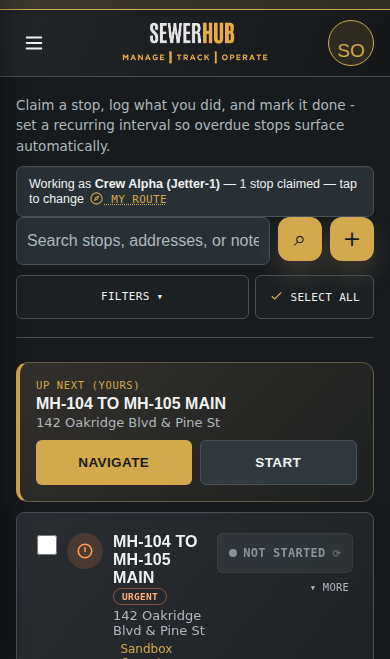
SewerHub Root List on a phone, showing an urgent stop and a claim button

It's the same workspace on a phone as it is at a desk — large buttons, one-tap claim, and clear status, built for reading in daylight with work gloves on.

Get started today

Bring your crew together.

Explore the workspace before bringing your team on board.

Built From The Field Up

I've worked for my city for 11 years, but SewerHub wasn't something I planned out — it was a spur-of-the-moment idea. I threw together a really simple, pretty rough first version just to track the Root and Grease lists, because we'd have a piece of paper with all the stops on it, then still have to pull out a phone separately just to navigate to the next one.

That first version wasn't much, but it was enough to get started. Once I got into it, I realized the same idea could help with a lot more than just Root and Grease — the rest of the collection system had the same problem. That's how SewerHub grew into what it is now.

— Chris, SewerHub

Why SewerHub Exists

Built Around the Way Sewer and Utility Crews Actually Work

Public works happens in the field, not just behind a desk. SewerHub replaces scattered paper forms, spreadsheets, and group messages with one straightforward place to see work and record what happened.

Field

Easy to Use in the Field

Large buttons, clear status labels, and a high-contrast screen help crews update work quickly from a phone or tablet.

Crew

See Who Is Doing What

Crews claim stops so everyone can see which team is handling each segment and avoid sending two trucks to the same job.

Ops

More Than a Work List

Keep collection work, treatment plant readings, permit checks, maps, vehicle inspections, time and material sheets, and complaints together.

Explore the modules

The right tools. All in one place.

Find the workflows that fit your team, from recurring maintenance to the records that support it.

Field operations

Root
Root Line Management
One running list of root-cutting stops, sorted by what's overdue. Claim one with a tap, log what you did, and mark it done — recurring intervals bring it back up automatically.
FOG
Grease & FOG Tracking
Grease trap stops on their own routine, separate from the Root list. Note what you found and when it's next due — the schedule keeps itself current so nothing slips past due.
Job
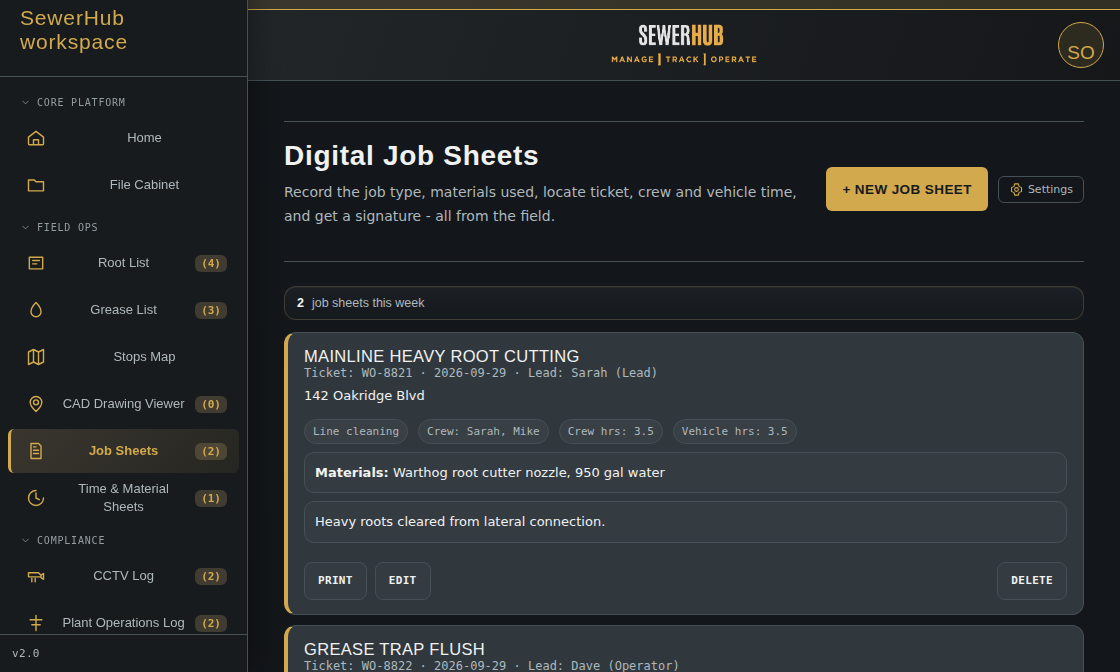
Digital Job Sheets
Record work orders, locations, pipe details, footage, water use, equipment, and crew hours from the field.
Import
Stop Data Import
Bring CSV, Excel, JSON, or GeoJSON stop records into the Root or Grease list — or import records into most other modules by matching columns to that module's own fields. PDFs and photos are stored separately in the File Cabinet.
CAD
CAD Drawing Viewer
Upload a DXF export straight from AutoCAD or Civil 3D and pan and zoom your sewer network drawing right in the browser - no plotting to PDF, no GIS calibration.
Storm
Storm Inlet Inspections
Track catch basin and storm inlet condition, blockage found, and whether it was cleaned out, right alongside your other field records.

Inspections & compliance

CCTV
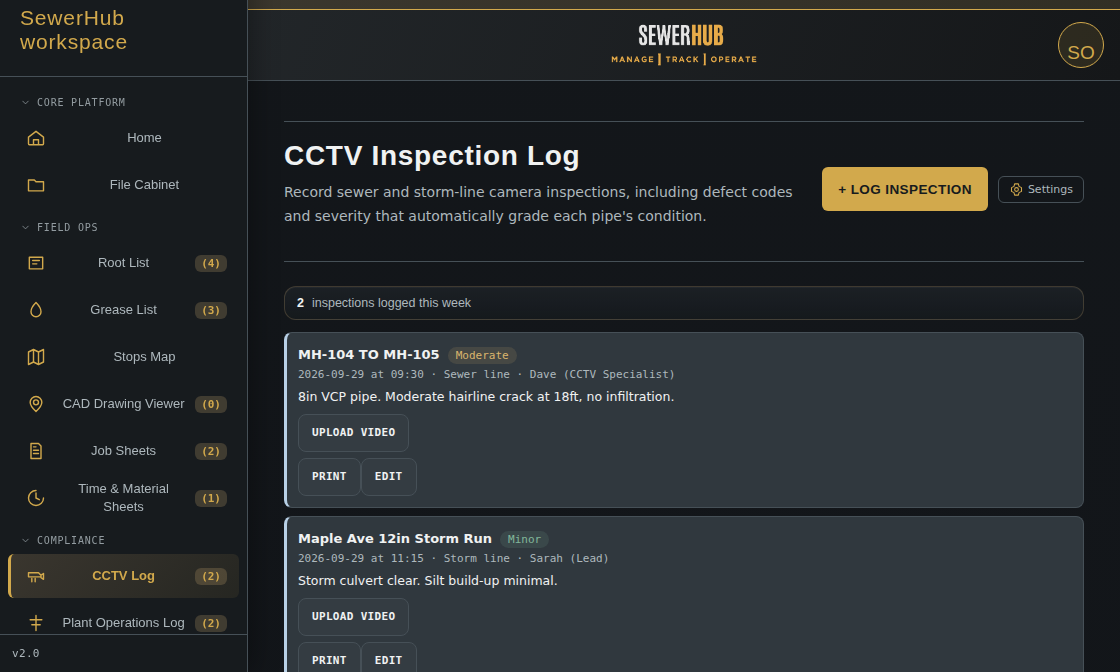
CCTV Video & Pipe Log
Know exactly what's inside every line without digging through old DVDs or loose files — record sanitary and storm camera inspections with PACP-style defect coding that grades pipe condition automatically.
Fleet
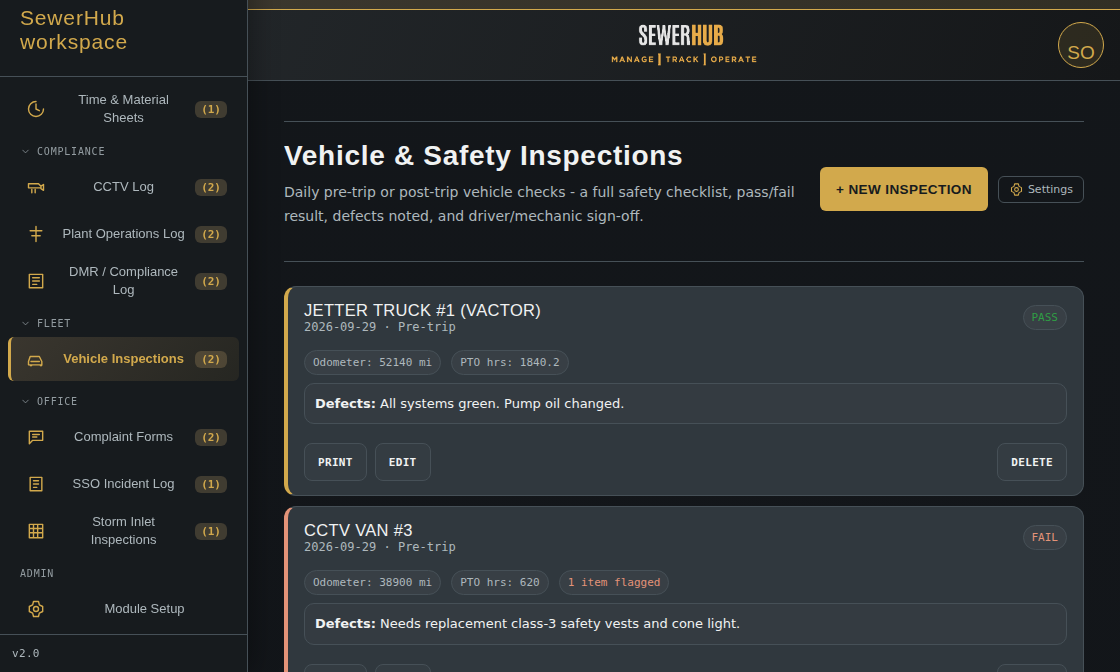
Vehicle & Safety Inspections
Catch a bad brake or a leaking hose before it becomes a breakdown — a customizable pre-trip checklist covering brakes to pump and fluid checks, plus defect reporting, all in one form.
Plant
Plant Operations Log
Capture shift-by-shift influent and effluent flow, pH, dissolved oxygen, MLSS, chlorine residual, turbidity, weather, alarms, and operator notes.
DMR
DMR & Compliance Log
Record discharge monitoring results, compare measured values with permit minimums and maximums, and automatically flag exceedances for follow-up.
SSO
SSO Incident Log
Log sanitary sewer overflow incidents - location, estimated volume, cause, and the corrective action taken, built around common EPA CMOM reporting fields you can adjust to match your permit.

Office & records

T&M
Time & Material Sheets (Historical)
Past time & material records stay here, fully viewable and exportable. New crew-hours, materials, and cost entries are now logged through Job Sheets, which covers everything this module did and more.
Case
Complaint Forms
Log a resident's report, assign the follow-up, add response notes, and track the issue from the first call through completion.
Files
File Cabinet
Owners, secretaries, and department bosses can organize PDFs, photos, scans, spreadsheets, and office documents into real folders, alongside saved work records like CCTV logs, job sheets, inspections, complaints, forms, and compliance entries.
Ext
Contractor Access
Give an outside company (an engineering firm, a contractor) a scoped login to pull specific CCTV videos themselves, instead of copying footage to a flash drive.
Open Contractor Access →
Common Questions

Everything You Need to Know Before Getting Started

Getting into SewerHub and finding your way around.

What is SewerHub?
SewerHub is an operations platform for sewer collection, wastewater treatment, compliance, CCTV, job sheet, vehicle, and utility work. It gives crews and operators one place to claim work, record readings and inspections, flag permit issues, and keep supervisors informed.
Can I try SewerHub without an account?
Yes. Choose Try the sandbox to open a sample workspace with no sign-up required. You can explore maps, job sheets, vehicle checks, camera inspection records, plant readings, permit checks, time and material sheets, complaint forms, and daily work statuses. Changes stay in the sandbox and never affect a real organization.
How does a new organization get started?
Choose Create workspace and enter your organization name, administrator name, email, username, and password. Save the company code provided after registration, then use it to bring employees into your workspace.
Is my organization's data private?
Yes. Each organization has a separate workspace partition for accounts, stops, groups, inspections, job sheets, and vehicle records. One organization's users cannot load another organization's operational data.
Can I get my organization's data out of SewerHub?
Yes. An administrator can export your organization's data at any time (Account menu → Export Data) as a downloadable JSON file — all stops, rosters, and custom form templates in full, plus the last 12 months of inspections, job sheets, DMR and compliance entries, vehicle records, time & material sheets, complaints, and SSO incidents. Older log entries stay in the system but aren't included in the export file. Uploaded files and videos (File Cabinet documents, CCTV footage) also aren't bundled into the export and would need to be downloaded separately.
Does SewerHub work on phones and desktops?
Yes. The interface is designed for touch use in the field and expands into a desktop operations workspace for supervisors and administrators. It can also be installed as a progressive web app on supported devices.
What's new

Recently shipped

A running, honest list of real updates - no placeholders.

Oct 2026
Job Sheets absorbs Time & Material Sheets. A per-person crew-hours ledger and materials quantity/unit tracking moved into Job Sheets. Time & Material's history stays fully viewable and exportable.
Oct 2026
Accessibility pass. Keyboard-friendly modals, screen-reader-friendly forms and toasts, a skip-to-content link, and page titles that update as you navigate.
Oct 2026
Simplified the public site. Trimmed duplicate sections across Home, Modules, About, and FAQ so Contact Us and the information you actually need are easier to find.
Oct 2026
Real 404 page, a sitemap, and a direct Contact Us path. An unknown link now shows a clear "page not found" message instead of silently redirecting to the homepage.
Oct 2026
Clarified what Export Data actually includes. The last 12 months of logs and paperwork, plus every stop and form template in full - stated plainly instead of an overstated "full backup."
Sep–Oct 2026
Shared Materials Catalog and Crew picker. Pick materials and crews from a saved list instead of retyping them on every job sheet, inspection, or report. Native browser popups were also replaced with the app's own styled confirm/prompt dialogs.
404

Page not found.

The page you're looking for doesn't exist, or the link may be out of date.

Sandbox Mode — Changes are local only and will not affect live crews
You're offline - changes are saved and will sync automatically
SewerHub
Loading…
Open0
Queued0
Priority0

Record

ADMIN

Module Setup

Enable or disable which modules exist for this organization. Turning one off hides it for everyone, regardless of position access.

ADMIN

Position Access

Choose what each operational position can see and do in the modules enabled in Module Setup.

Hidden removes the module. View is read-only. Work allows entries. Manage allows deletion and setup.

ADMIN

Contractor Access

Give an outside company (an engineering firm, a contractor) a scoped login to pull specific CCTV videos themselves, instead of copying footage to a flash drive.

No CAD drawing uploaded yet.
Upload a DXF file to see it here.
Stops on Map
Group / color by

Claim a stop, log what you did, and mark it done - set a recurring interval so overdue stops surface automatically.

CCTV Inspection Log

Record sewer and storm-line camera inspections, including defect codes and severity that automatically grade each pipe's condition.

Digital Job Sheets

Record the job type, materials used, locate ticket, crew and vehicle time, and get a signature - all from the field.

Vehicle & Safety Inspections

Daily pre-trip or post-trip vehicle checks - a full safety checklist, pass/fail result, defects noted, and driver/mechanic sign-off.

Plant Operations Log

Shift readings for flow, pH, dissolved oxygen, MLSS, and chlorine residual at the treatment plant.

DMR / Compliance Log

Discharge Monitoring Report entries with automatic permit-limit exceedance flagging.

SSO Incident Log

Sanitary sewer overflow incidents - location, cause, volume, and corrective action. General-purpose template based on common EPA CMOM reporting fields; check it against your permit's specific requirements before relying on it for an official submission.

Storm Inlet Inspections

Catch basin and storm inlet inspections - structure condition, blockage found, and whether it was cleaned.

Time & Material Sheets

Historical sheets recorded here stay fully viewable and exportable. New crew-hours, materials, and cost entries are now logged through Job Sheets - nothing already recorded here is lost or hidden.

Complaint Forms

Log public complaints, assign follow-up, and document resolution from intake through closure.

0 stops selected